SSHTOOLKIT
By frost-bit-star • v1.0.0
App DevOps , cloud computing, system admin ,cyber sec Android mit
SSH Toolkit for Android
SSH Toolkit is a native Android application designed to turn your smartphone into a powerful remote server administration workstation.
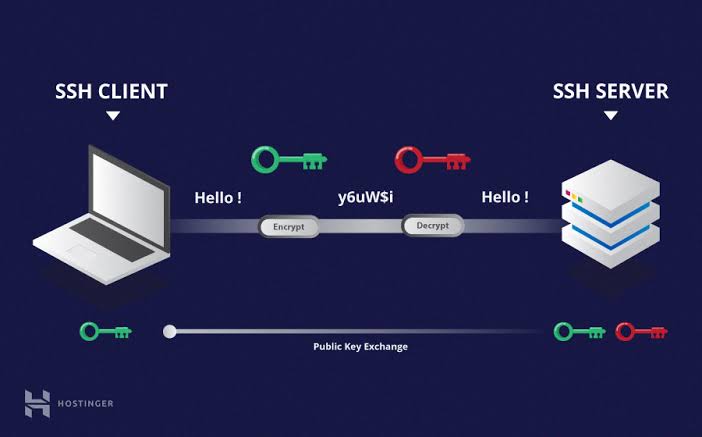
Connect to remote Linux servers through SSH, execute commands in a fully interactive terminal, manage files through SFTP, monitor network connectivity, and create secure port-forwarding tunnels — all from one application.
Built with Java and powered by the Termux terminal emulator, SSH Toolkit provides a practical mobile environment for developers, system administrators, DevOps engineers, and cybersecurity professionals.
Key Features
SSH Terminal: Interactive remote shell with terminal emulation and extra keyboard keys.
SFTP File Manager: Browse remote directories, upload, download, rename, and delete files.
Server Management: Perform remote administration directly from your Android device.
Network Diagnostics: Run ping tests, DNS lookups, and TCP connectivity checks.
Port Forwarding: Create local SSH tunnels for accessing remote services securely.
Server Snapshots: Retrieve useful server information and diagnostics.
SSH Key Management: Generate and manage SSH authentication keys.
Secure Credentials: Store passwords using AES-GCM encryption backed by Android Keystore.
Host Verification: Strict SSH host-key checking to protect against unauthorized server impersonation.
Local-First Architecture: No account registration or cloud backend required.
Built For
Developers
Linux administrators
DevOps engineers
System administrators
Network engineers
Cybersecurity professionals
SSH Toolkit brings essential remote server management capabilities to your Android device, giving you the freedom to administer your infrastructure wherever you are.
SSH Toolkit is a native Android application designed to turn your smartphone into a powerful remote server administration workstation.
Connect to remote Linux servers through SSH, execute commands in a fully interactive terminal, manage files through SFTP, monitor network connectivity, and create secure port-forwarding tunnels — all from one application.
Built with Java and powered by the Termux terminal emulator, SSH Toolkit provides a practical mobile environment for developers, system administrators, DevOps engineers, and cybersecurity professionals.
Key Features
SSH Terminal: Interactive remote shell with terminal emulation and extra keyboard keys.
SFTP File Manager: Browse remote directories, upload, download, rename, and delete files.
Server Management: Perform remote administration directly from your Android device.
Network Diagnostics: Run ping tests, DNS lookups, and TCP connectivity checks.
Port Forwarding: Create local SSH tunnels for accessing remote services securely.
Server Snapshots: Retrieve useful server information and diagnostics.
SSH Key Management: Generate and manage SSH authentication keys.
Secure Credentials: Store passwords using AES-GCM encryption backed by Android Keystore.
Host Verification: Strict SSH host-key checking to protect against unauthorized server impersonation.
Local-First Architecture: No account registration or cloud backend required.
Built For
Developers
Linux administrators
DevOps engineers
System administrators
Network engineers
Cybersecurity professionals
SSH Toolkit brings essential remote server management capabilities to your Android device, giving you the freedom to administer your infrastructure wherever you are.
★ 0/5 (0 reviews) • 3 downloads
Leave a Review
Reviews
No reviews yet. Be the first!